Nickya Frederick
Customer Support Operations Consultant
Support Operations System Setup

Your support team is growing. Your support system isn’t.

I help BPO operators and scaling startups install a support operating system — scripts/macros, SOPs, escalation rules, QA standards, and queue structure.

So customers get consistent answers and your team stops reinventing the wheel.

Zendesk Intercom Gorgias Freshdesk Help Scout Notion Google Workspace
Diverse team reviewing support workflows in a modern office
Not “communicate better.” I build the operating structure underneath the communication.
Support Queue Sample View
Needs response today 0 tickets
Escalation review 0 handoffs
QA sample 0 interactions
Scripts + Macros SOPs Escalation Rules QA Scorecards Tags + Queues Scripts + Macros SOPs Escalation Rules QA Scorecards Tags + Queues Scripts + Macros SOPs Escalation Rules QA Scorecards Tags + Queues
Where support breaks

It usually is not a people problem.

Most teams don’t lose trust because support doesn’t care. They lose trust because the system is undefined: inconsistent answers, unclear ownership, missed SLAs, and escalations that bounce until someone senior steps in.

If agents are asking the same two questions in Slack all day, the system is missing.

Team mapping workflows with sticky notes on a whiteboard
  • Inconsistent answersDifferent agents give different answers to the same question depending on who picks up the ticket.
  • Escalations that bounceTier 1 does not know what to do, tier 2 gets overloaded, and leadership becomes the default path.
  • SLA misses / backlog aging“Needs response today” exists in theory, but there is no reliable queue owner or follow-up rhythm.
  • Refunds + edge casesExceptions are not standardized, policies get applied inconsistently, and customers feel the uncertainty.
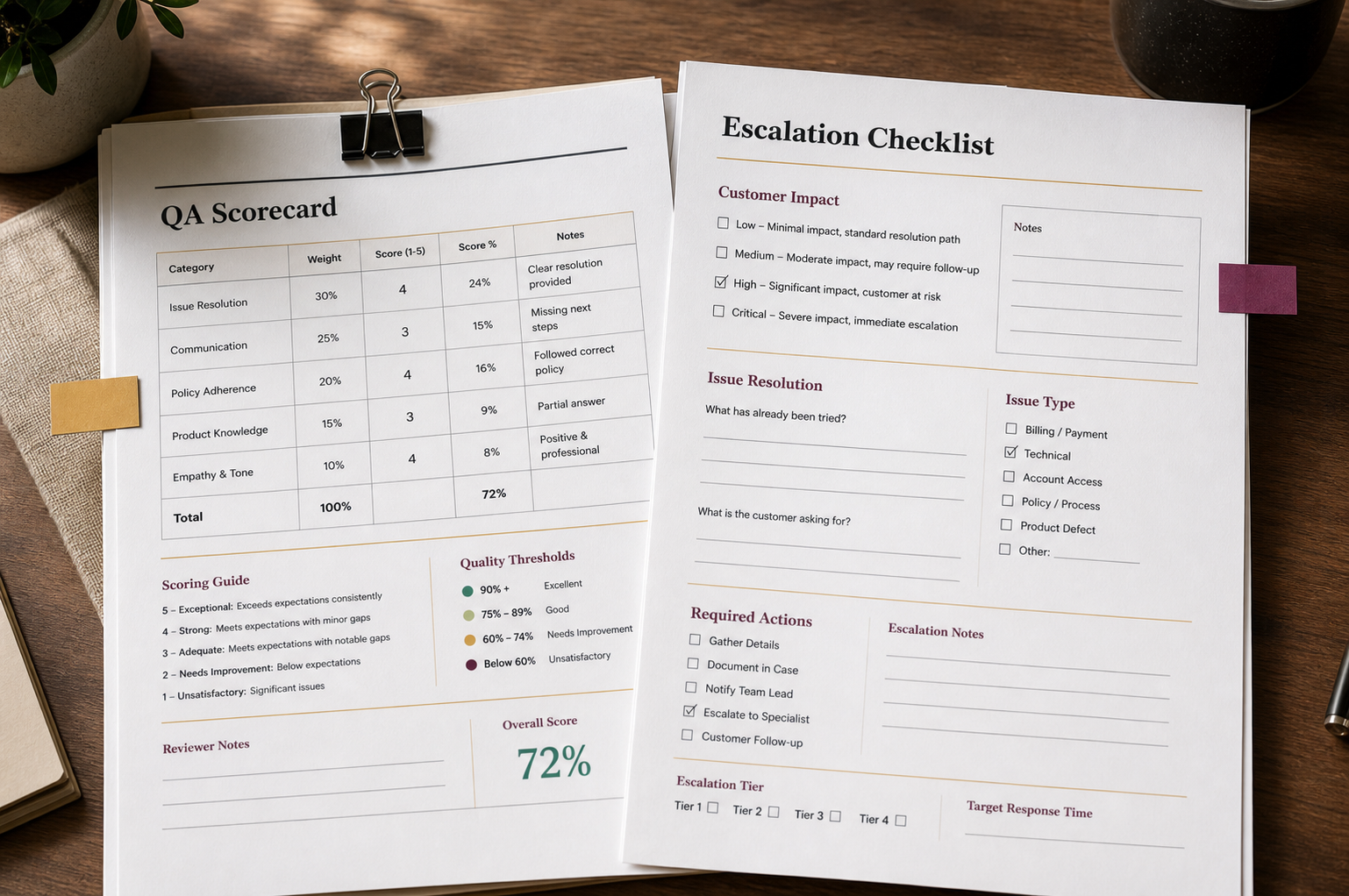
  • QA is ad hocNo weekly calibration loop, no scorecard, and no mechanism for turning real issues into better scripts and SOPs.
  • Onboarding lives in someone’s headNew hires ramp slowly, quality drops when volume spikes, and leads repeat the same explanations.
What I build

Support infrastructure your team can actually run.

This isn’t generic “be nicer to customers” advice. It is the structure underneath support: what to say, where to route, when to escalate, and how to review quality every week.

01

Support Ops Audit

A review of your channels, workflows, ownership, SLAs, escalations, and where consistency breaks down.

02

Scripts + Macros Library

Clear language for top scenarios, edge cases, and escalation handoffs — built to match your brand voice.

03

SOPs

Step-by-step procedures for intake, escalation, refunds/credits, follow-up standards, and resolution closeout.

04

Escalation Rules

Simple rules for what tier 1 can resolve, what escalates to tier 2, and what requires leadership approval.

05

Tags/Queues + Queue Views

A simple taxonomy and queue views so nothing disappears — and “what needs a response today” stays visible.

06

Training Walkthrough

A recorded walkthrough plus handoff notes so leads can onboard the team quickly.

Operator point of view

The work is fewer dropped balls.

Better support does not come from telling agents to try harder. It comes from giving the team a shared system for what to say, where to route, when to escalate, and how to document the next step.

“If the answer changes depending on who picks up the ticket, the team does not have a support system yet.”
How it works

Fast, practical, built around reality.

We start with how support actually moves today — then clean up the pieces that create repeated tickets, stalled escalations, and leadership fire drills. Draft system in 7–10 business days. Stabilization runs weekly for 30 days.

01

20-Min Support Review

On this call, we map your support flow and identify the top 2–3 gaps: ownership, escalations, QA, SLAs, tagging, or onboarding.

02

Ops Audit

I review what is happening today across channels, workflows, escalations, and QA.

03

Build

Scripts/macros, SOPs, escalation rules, QA scorecard, and tags/queues are built around real scenarios.

04

Rollout

Leads train first. Agents onboard next. QA starts immediately so refinements come from real interactions.

Offers

Two ways to start.

Start with a clean setup, or add 30 days of stabilization so the system gets refined while the team starts using it.

Best fit: teams with an active support function — startup support team, BPO delivery team, or growing ops team.

Tier 1 — Support System Setup

$1,500 – $2,500

Best for: teams that need the system installed fast and can run it internally.

You’ll receive: Script/macro library + SOP pack + escalation map + QA scorecard + tagging/queue map + walkthrough recording.

  • Support Ops Audit
  • Scripts + macros library
  • Escalation rules + decision tree
  • 2–3 SOPs
  • Tags/queues + tracking recommendations
  • QA scorecard
  • 60–90 minute recorded walkthrough

Tier 2 — Setup + 30-Day Stabilization

$3,000 – $5,000

Best for: teams that want setup plus stabilization while the team starts using it.

  • Everything in Tier 1
  • Weekly QA review of 5–10 interactions
  • Macro/script + SOP refinements
  • Tagging/queue workflow refinements
  • System recommendations if tooling/workflows cause misses
  • Final 30-day improvement summary
What changes

Less guessing. More shared standards.

The goal is not to make support robotic. The goal is to give the team a shared way to handle repeat situations, review quality, and know when something needs to move up.

Support team working with headsets in a customer operations environment
About Nickya

Operator brain. Clean systems.

I’m Nickya Frederick, a Customer Support Operations Consultant.

I build the scripts, SOPs, escalation rules, and QA loop your leads wish existed last quarter.

I help BPO operators and scaling startups turn messy support into a clear operating system so tier 1 knows what to do, escalations stop bouncing, QA becomes a weekly habit, and the team knows exactly what happens next.

Proof

Sample work available on request.

I can share a one-page preview, a before/after sample audit, or a sample support system preview so you can see the structure before we talk.

Start here

Want to see where your support system is leaking?

Book a 20-minute Support Review Call. You will leave with your top 2–3 support gaps and the clearest next step — whether we work together or not.

Book a 20-Min Support Review